


On page SEO for service pages should help a potential customer understand what you do and help a search engine understand which need the page answers. On-page SEO connects those two jobs through clear targeting, useful content and accurate technical signals. It is not a matter of repeating a city and service name until a plugin indicator turns green.
This guide walks through a single service page from keyword mapping to public verification. It concentrates on organic search relevance, page metadata, content evidence and internal context. It does not replace a full landing-page design review, local map strategy or technical site audit; those are separate tasks with different evidence.

Step 1 Select one service intent
Choose a service that the business genuinely supplies and define the reader’s decision. A person comparing an installation provider needs different information from someone troubleshooting an existing product. Write the primary intent before editing the title or heading.
Check whether an existing page already answers the need. Search your site inventory and review the queries that existing pages receive. If two URLs describe the same service for the same audience, decide which should be the main page before adding more copy. A new page should have a distinct purpose, not just a different keyword variation.
For a hypothetical WordPress maintenance service, the main intent might be understanding scope, support boundaries and how to enquire. A tutorial about updating a plugin can support that page without trying to replace it in every search result.
Step 2 Build an evidence and question map
List the questions a suitable customer must resolve: what is included, who the service fits, what access is needed, what the process involves, what affects the quote and what happens after handover. Add evidence the business can verify, such as a real process, approved project screenshots or genuine qualifications.
Separate confirmed facts from information awaiting approval. Do not fill a gap with invented turnaround times, client logos or success percentages. If pricing varies, explain the factors and the information needed for a quote rather than manufacturing a starting price.
Map each question to a short section. This creates a useful outline while giving the writer a reason to include supporting terminology naturally. Do not add an FAQ simply to repeat sentences already present in the main page.
Step 3 Write a descriptive SEO title
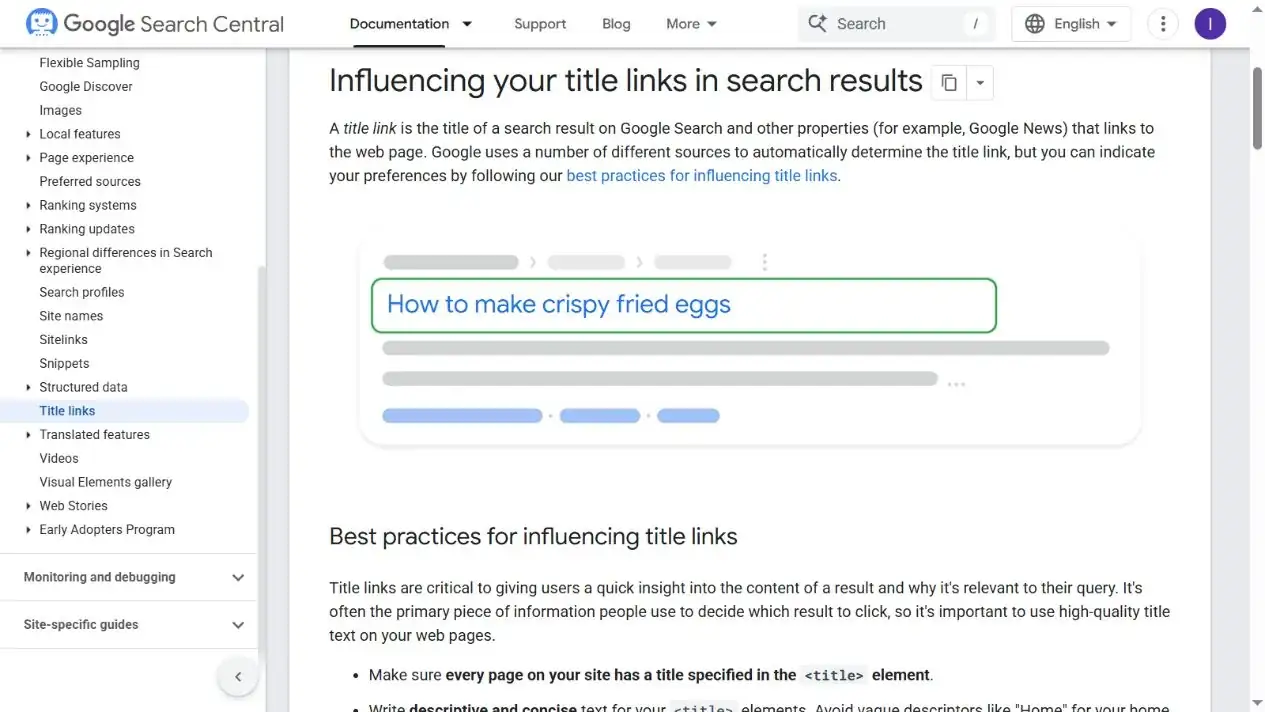
Use the main service and relevant location where they describe the actual offer. A working example is “WordPress Maintenance in Dubai | Example Company.” The example is fictional and should be replaced with the real service and brand. The title should distinguish the page from sibling services.
Avoid repeated keywords, unsupported superlatives and a list of cities. A title such as “Best Cheap WordPress Maintenance Dubai UAE Abu Dhabi” creates ambiguity and can overstate the offer. Put the important meaning first and use the brand where it fits naturally.
An editorial character budget can help previews remain readable, but Google does not impose a universal title-character rule and can generate a different title link. Check the public title element, not only the SEO plugin preview. Make sure a global template does not append the brand twice.
Open full screenshot
Step 4 Write a meta description that supports the decision
Summarise the actual service, a useful distinction and the next step. A hypothetical description could explain that the page covers updates, backups and support scope, then invite the reader to request a plan. Do not promise a response time or service level the business has not approved.
Keep descriptions unique across meaningful service pages. If the SEO plugin uses an automatic excerpt, inspect the public output for truncated fragments, shortcodes or accidental words. A good editor preview does not prove the social description or live HTML matches it.
Descriptions influence the message available for search snippets, but Google can select other text. Judge them by accuracy and relevance rather than a promise that the exact text will always appear. Do not treat the meta description as a direct ranking lever that compensates for a weak page.
Step 5 Give the visible page a clear heading structure
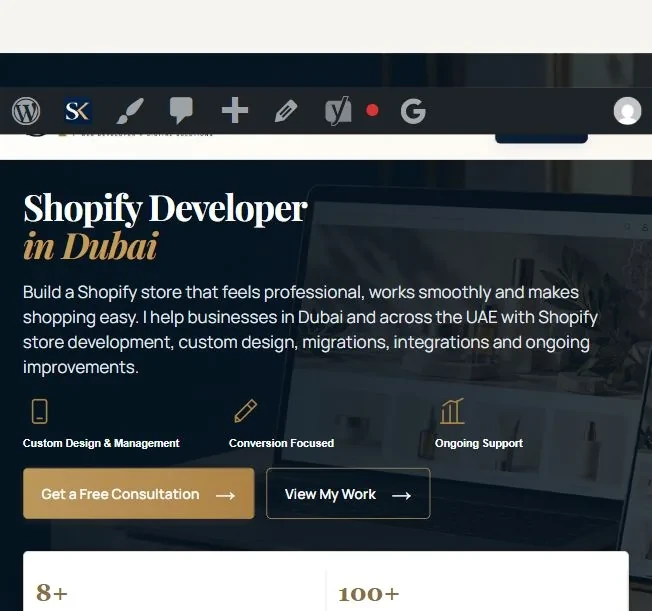
Use a prominent main heading that accurately names the service. Organise the rest into sections the reader can scan. Headings should describe the section below them, such as scope, process, requirements and handover, rather than being a repeated version of the target phrase.
Inspect the public page structure after editing. A template can introduce additional headings through a header, card or hidden section. Multiple H1 elements are not automatically a Google penalty, but a single clear main heading is a straightforward editorial choice for this type of page.
Do not choose heading levels for font size alone. Keep the logical hierarchy and style it separately. A visually large testimonial title should not interrupt the service explanation’s structure merely because the designer chose a large heading widget.
Open full screenshot
Step 6 Explain the service in operational detail
Replace general claims with the information a customer needs to judge fit. For maintenance, explain how work is requested, what the provider monitors, what access is required and which third-party costs remain outside scope. For development, distinguish design, content preparation, integrations and handover.
Use concrete examples without pretending they are completed client results. A sentence such as “An integration request needs the platform name, intended data flow and access owner” is more useful than “We deliver innovative solutions.” Where a genuine project is relevant, link to the approved case study and describe only verified work.
Add exclusions where they prevent misunderstanding. A service page can say that emergency recovery, content entry or paid app subscriptions require separate agreement if that is the real business policy. Accurate boundaries can improve enquiry quality even when they reduce unsuitable submissions.
Step 7 Use images as evidence
Choose a screenshot that demonstrates the section’s point. If you show a delivered website, identify the project and the feature being illustrated. If you show an administrative workflow, remove private data and label a demo as a demo. Do not use a decorative mockup as proof of a measured outcome.
Compress the image for the displayed dimensions and retain readable text. Write alt text describing the meaningful content in context. A decorative image can have empty alt text when the surrounding structure already carries the meaning. Do not insert the target keyword into every image description.
Keep captions specific: “Desktop and mobile navigation for the approved project” is clearer than “Our amazing work.” Ensure enlarged screenshots can be closed by keyboard and do not obstruct mobile navigation. These checks protect the customer journey while supporting the content.
Step 8 Add useful internal links
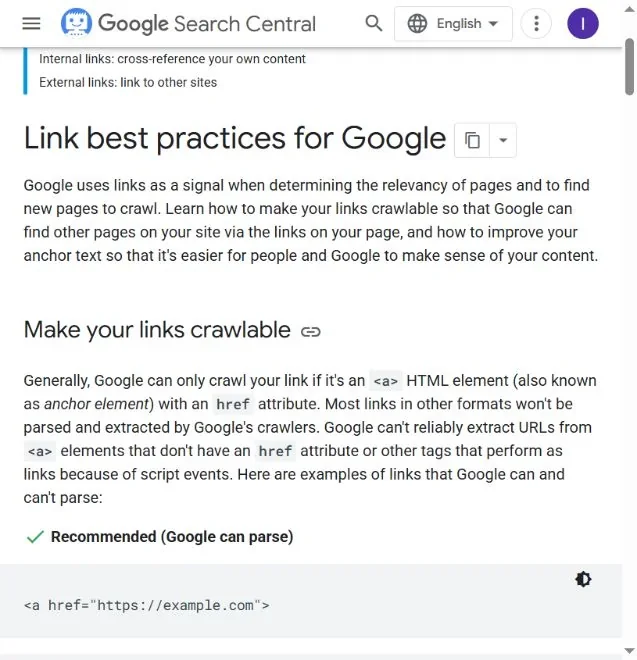
Link from relevant service overviews and guides to the main page using descriptive wording. A customer reading a maintenance checklist may reasonably need the maintenance service next. A page about payment gateways may link to integration support where that is a genuine next step.
Keep links in meaningful context rather than repeating a commercial anchor in every paragraph. Check that each target is public, returns the intended page and is not a preview or unpublished article. Use the preferred URL and avoid unnecessary redirect chains.
Open full screenshot
Step 9 Verify indexability and canonical signals
Open the live page without signing in. Confirm that it returns the expected content, is not unintentionally marked noindex and has the intended canonical URL. If the site uses an SEO plugin, inspect its live output rather than assuming the saved setting has reached the cached public page.
A canonical is a consolidation signal, not a way to make unrelated content rank. A noindex directive may be intentional on a utility page, but it is normally a problem when it accidentally applies to the primary public service page. Do not remove all exclusions across the site just to make an audit count smaller.
Use URL Inspection for an owned property when necessary. Distinguish Google’s stored indexing information from a live test and from an indexing request. Submitting a request does not guarantee inclusion or a particular position.
Step 10 Check the enquiry route
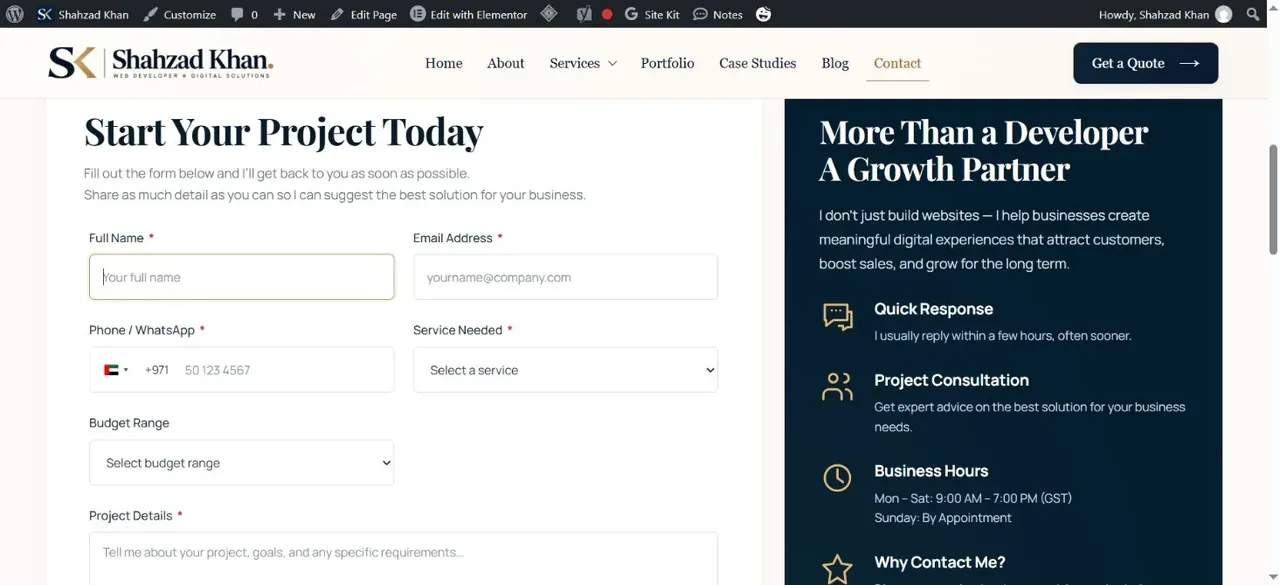
Follow the page’s primary call to action on a phone and desktop. Confirm that an anchor points to an existing form, a telephone link uses the right number and a WhatsApp action reaches the intended business account. A technically optimised page with a broken contact route fails the commercial task.
Test forms through an authorised process and distinguish field validation, successful submission and actual receipt. Do not create repeated live test enquiries without coordinating with the business. Check that the user sees a clear success or error state and knows what happens next.
Record the primary action and how the business confirms a qualified enquiry. Use the existing enquiry tracking guide for measurement setup rather than treating a button click as a completed lead.
Open full screenshot
Step 11 Measure the page without chasing every fluctuation
Keep a dated record of changes to the title, sections and internal links. Review search queries and useful enquiries over comparable periods. Check whether the page attracts the intended service need and whether those enquiries fit the business.
If impressions rise but enquiries remain unsuitable, investigate the intent and offer. If clicks fall after a title change, compare the queries, positions and search demand before blaming the wording alone. Avoid changing titles every few days because a small sample moves.
A service page review worksheet
Write the service intent, primary page, target reader and evidence needed at the top. Then check title, description, main heading, scope, process, proof, images, contextual links, canonical, indexability and contact journey. Record pass, problem or not applicable for each item, with the exact URL and correction owner.
This worksheet is a practical review method rather than a search-engine scoring formula. Its value comes from making the page understandable and testable. A plugin score can help flag an omission, but it cannot judge whether a claimed service is genuine or whether the explanation answers the customer’s question.
Frequently asked questions
Should every service page target Dubai
Use a location when it accurately describes the offer and helps the customer. A platform-wide technical guide may not need a city in its title. Do not create near-identical city pages without genuine local value.
How many times should I repeat the keyword
There is no useful universal density target. Include the main phrase naturally and use the terminology needed to explain the service. Read the page aloud; if repetition makes it awkward, improve the writing.
Is this the same as a landing-page redesign
No. This workflow audits organic targeting and page signals. The existing service landing-page guide covers broader presentation and conversion structure. Use the two together where both tasks are needed.
Sources and verification
Checked 30 October 2026: Google title-link guidance, meta descriptions, crawlable links, image guidance, canonical signals. Page examples and review worksheet are original editorial material. No live service page was edited for this guide.