

UAE business listing sites are useful when they help a real customer discover the right company, confirm its details and take the next step. It is less useful when it exists only to add another backlink to a spreadsheet. For a UAE business, the practical starting point is a small set of accurate profiles on relevant search platforms and local directories, followed by a routine for checking enquiries and keeping information current.
This guide explains where to start, how to prepare a listing, how to submit information without creating duplicates and how to decide whether a paid upgrade deserves your budget. It also separates a marketing listing from an official business register. Appearing in a directory does not register a company, replace a trade licence or guarantee a Google ranking.
Decide what type of listing you need
A customer-facing shop needs accurate map information, opening hours and a route to the premises. A service business needs clear service coverage and a working enquiry method. A B2B supplier benefits from product categories and enough technical information for a buyer to judge relevance. An online-only store needs product discovery and a trustworthy website; it should not invent an address to qualify for a map profile.
Write down the business model before opening any submission forms. Record whether customers visit your location, whether you visit customers, which emirates you actually serve and which products or services generate the most suitable enquiries. This short exercise prevents a common mistake: copying a competitor’s categories or address format when your own business operates differently.
Prepare one accurate business information sheet
Create a shared document containing the trading name, legal entity name where requested, website, public telephone, monitored business email, opening hours and genuine address or service area. Store the approved English and Arabic names separately. Use the spelling customers see on your website and signage; do not insert extra keywords into the name field.
Prepare a plain-language description explaining who you help, what you supply and where you operate. For example, a hypothetical equipment supplier could write: “We supply access-control and visitor-management equipment to commercial customers in Dubai and arrange quotations based on project requirements.” This is an illustrative description, not a claim about a named company.
Keep a square logo and several genuine photographs ready. Use a compressed image that remains clear at the platform’s displayed size. Check the current upload requirements rather than assuming every directory accepts the same format. Remove private paperwork, customer details and account information from photographs. A trade licence may be necessary for private verification, but that does not mean it belongs in a public gallery.
Choose the right platforms
| Platform | Suitable purpose | Verified starting point | Cost and eligibility notes |
|---|---|---|---|
| Google Business Profile | Eligible local and service-area businesses | Add or claim a profile | Profile creation is free; eligibility and verification apply. |
| Apple business listing tools | Manage the business presence available through Apple’s current business platform | Apple Business | Confirm UAE location and account eligibility in the current platform. |
| Bing business listings | Manage business information appearing in Bing Maps | Microsoft listing guidance | Use Microsoft’s current claim or update route; country support must be checked. |
| Yellow Pages UAE | Local supplier and service discovery | List your business | The site advertises free listings; distinguish them from advertising upgrades. |
| ATN Info | UAE B2B company discovery | Free listing form | Basic UAE company details and one classification are described as complimentary; several enhancements are paid. |
| Official Dubai business directory | Check the existing official business record | Invest in Dubai directory | A lookup register is not an open marketing submission service. |
These are starting points rather than a promise that every business can create every type of profile. If a platform does not support your location or business model, skip it. Do not use a false address or a different country to force acceptance. For a regulated business, verify whether advertising or disclosure rules affect the information you can publish.
Step 1 Search for an existing profile before adding one
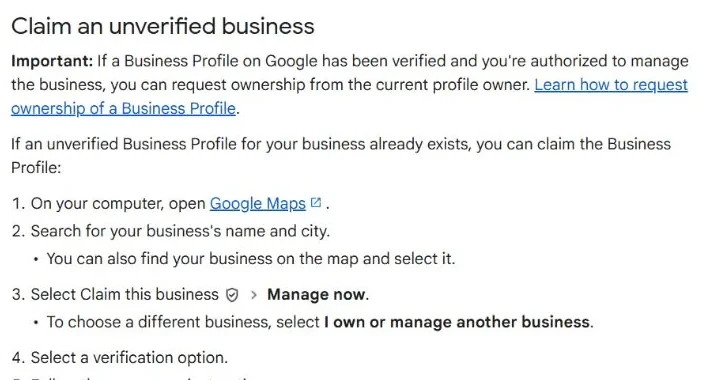
Search each platform using the trading name, telephone and old address. An earlier owner, staff member or data provider may already have created a record. If a matching record exists, use the platform’s claim or correction process. Creating another profile can split customer information and make later updates harder.
Check whether the record represents the same business and branch. Two genuinely separate branches may need separate profiles, while two spellings of one branch usually do not. Record the existing profile URL and the account responsible for it. Where ownership is unclear, gather proof through the official process rather than asking a third party to transfer a password.
Open full screenshot
Step 2 Complete the Yellow Pages UAE form
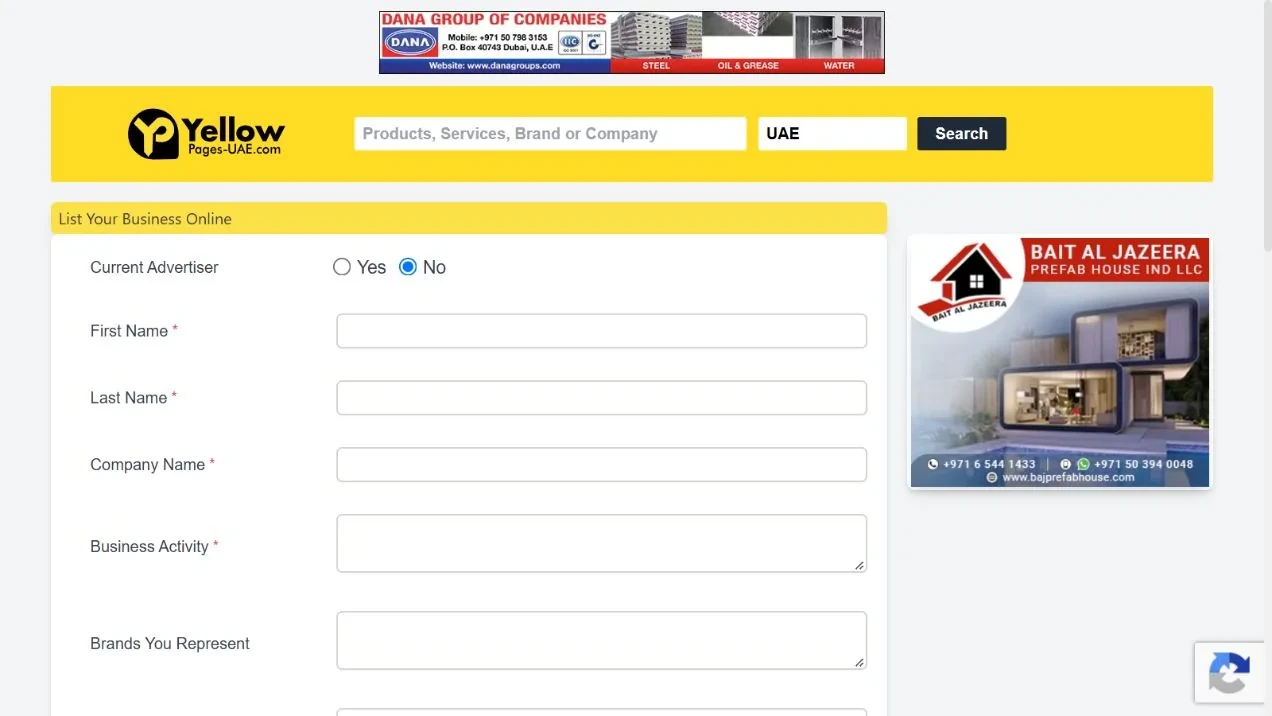
Open the verified submission page linked above. Review the current advertiser question and enter the contact person’s name in the contact fields. Put the company name in the business name field, not a list of target keywords. Explain the main business activity using the services or products customers actually request.
Complete the public telephone, monitored email and HTTPS website address. Add genuine location details in the corresponding fields. Keep office number, building, locality and city separate so the record remains readable. If you do not have a requested piece of information, ask the directory how to handle it; do not fabricate a P.O. box or office number.
Read the terms and privacy information before submitting. Keep a dated copy of the information you supplied and any confirmation reference. Submission is an application for a listing, not proof that a public page is already live. Search for the business later and inspect the published record before marking it complete in your tracker.
Open full screenshot
Step 3 Complete the ATN basic listing carefully
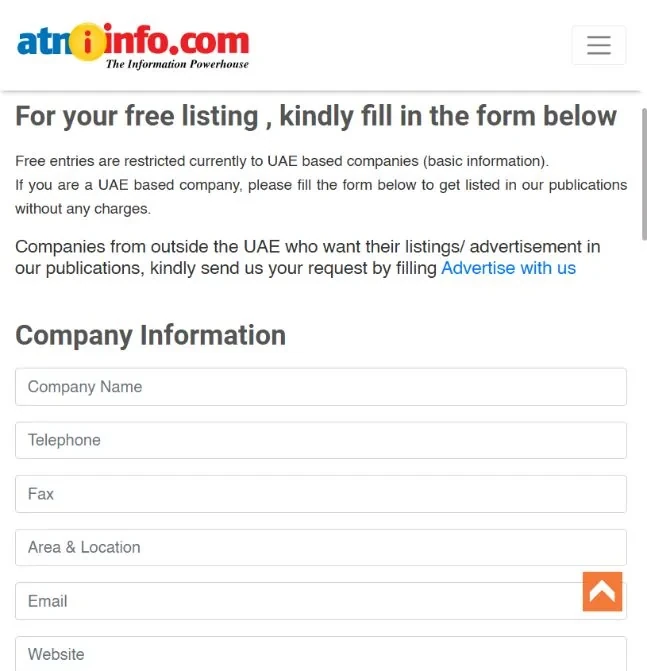
Open ATN’s free-listing page and read the distinction between complimentary information and paid services. The page states that free basic entries are currently restricted to UAE-based companies. It also separates basic company details and one classification from paid options such as a fuller profile, additional promotional features and media.
Fill in the company name, location, website and public contact details from the same approved information sheet. Choose the most accurate main classification. Add contact people only when they have agreed to be listed or contacted, and establish whether those fields are for verification or public display. Avoid spreading a staff member’s private mobile number across directories.
If you only want a basic entry, do not select optional sales-contact or paid-service requests without intending to receive that follow-up. Record what you requested and retain the confirmation. If the directory contacts you about an upgrade, ask for the exact public placement, duration, reporting and renewal terms before considering payment.
Open full screenshot
Step 4 Set up eligible map profiles through their official processes
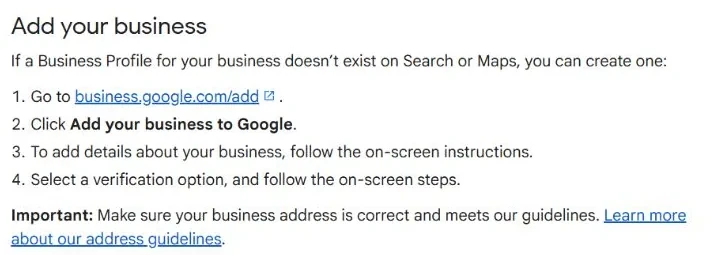
For Google, check eligibility first, search for the existing business and then use the official add or claim process. Select a category that describes the main business. Enter real opening hours and configure the address or service-area information according to how the business operates. Complete the verification method Google offers; methods and requirements vary.
For Apple and Bing, start from the official links in the table rather than an unsolicited email promising verification. Check the account already controlling the business and the supported location options. Keep ownership in a business-controlled account with appropriate staff access. Do not pay a directory agent merely because they imply they are the search platform itself.
This article focuses on listing selection and submission. For detailed local website and profile foundations, use the separate local SEO setup guide. A map profile is one part of discovery, not a replacement for a useful service page.
Open full screenshot
Step 5 Verify the published listing as a customer
Once a record appears, open it without signing into the management account. Check the name, address, map pin, website destination, click-to-call action and visible category. A correct form submission can still produce a misspelled or incomplete public record. Test the actual published links rather than relying on the confirmation email.
For a website link you control, consider a consistent campaign parameter such as utm_source=directory-name&utm_medium=referral&utm_campaign=business-listings. Use it only where the platform accepts parameters and keep your normal canonical website URL unchanged. A parameter helps attribution; it does not turn a listing into a stronger backlink.
Ask the team answering calls and messages to record the referral source when customers know it. Some enquiries happen without a website click. Maintain a simple distinction between profile views, website visits, enquiries and qualified enquiries so a large view count does not look like business value by itself.
Step 6 Maintain a listing tracker
Use columns for platform, profile URL, owner account, date submitted, live status, last check, correction needed, annual cost and qualified enquiries. Do not store passwords in the sheet. Link to your approved password-management process instead. Assign an owner to check records after a telephone, address or opening-hours change.
Review the tracker monthly while listings are being established and after any major business change. If a platform repeatedly changes your details, loses updates or delivers irrelevant leads, record the evidence. Time spent maintaining a poor listing is still a cost even when the entry itself is free.
Decide whether a paid directory upgrade is worthwhile
Ask what the payment buys: extra categories, a sponsored position, an enhanced company page or a defined advertising placement. Request an example of the exact placement and a report showing useful actions. Do not accept “high domain authority” as a substitute for audience relevance, measurable enquiries or clear terms.
Set an affordable test budget and decide how many qualified enquiries would make the upgrade worthwhile. Compare the cost with the likely value and close rate of those enquiries. Do not extrapolate from a supplier’s best customer story to your own business. If the campaign cannot be measured, treat its expected return as uncertain.
Common problems and the next action
If a duplicate appears, use the platform’s correction process rather than adding a third version. If verification fails, confirm that the submitted details match genuine business evidence. If the website link is wrong, request correction and test the final destination. If you receive irrelevant enquiries, review the category and description before buying more exposure.
If there are no enquiries after a reasonable observation period, check whether the platform serves your customers at all. A directory can have genuine businesses and still be a poor fit for your sector. Keep useful entries accurate and invest further effort where potential customers actually compare suppliers.
Frequently asked questions
Should I submit to hundreds of directories
No fixed number makes a listing programme successful. Start with relevant platforms you can verify and maintain. Google identifies low-quality directory links as a potential link-spam pattern when they are created to manipulate rankings. A smaller, accurate portfolio of listings is easier to manage and evaluate.
Can an online-only store create a Google Business Profile
Not simply because it sells online. Check Google’s current eligibility rules and whether there is genuine qualifying customer contact. Never invent a customer-facing office. Product discovery through Merchant Center is a different route and may be more suitable for an eligible retail store.
Will submitting a listing immediately improve rankings
Publication, discovery, crawling and ranking are different events. A submission may take time to appear and may not produce a backlink or ranking change. Judge listings by accurate visibility, referral visits and relevant enquiries rather than a promised position.
Your next action
Prepare the information sheet, find existing records and complete the two verified local submission workflows that fit your business. Then verify the public pages and begin tracking enquiries. If customers reach the website but cannot understand your services or make contact, improve that journey through the SEO services page before paying for additional directory exposure.
Sources and verification
Platform features and public forms checked on 30 October 2026. Sources: Google eligibility, Google add or claim, ATN free entry, Yellow Pages submission, official Dubai business directory, Google link-spam policy. Recheck terms before publication.