


A website redesign should solve a business problem, not simply replace one set of colours with another. If visitors cannot understand your services, use the site comfortably on a phone or send a working enquiry, a new visual style alone will not fix the experience.
This website redesign checklist helps Dubai businesses decide what to keep, what to repair and what to rebuild before investing in a new site. It applies to service websites, WordPress builds and ecommerce storefronts, although each platform needs its own technical checks.
1. Define what the redesign needs to improve
Start with a short list of observable problems. “Make the website modern” is difficult to measure. “Help visitors find the right service and submit an enquiry on mobile” gives your designer a clear journey to improve.
- Which products or services should the website prioritise?
- Which visitors are you trying to reach: local customers, corporate buyers or international shoppers?
- Where do visitors get stuck, based on enquiries, customer feedback and available analytics?
- What action should each important page encourage?
Keep a baseline of existing enquiries, sales and useful engagement events where tracking is available. These numbers provide context for later review; a redesign does not guarantee higher traffic or conversions.
2. Audit the pages you already have
Create a page inventory before deleting content. List important URLs, their purpose, existing search visibility, inbound links and whether the information is still accurate. A dated page may still answer a valuable question or attract relevant visitors.
Assign each page one decision: keep, improve, merge or retire. Rewrite vague service descriptions, remove unsupported claims and check that contact information, project examples and service coverage are current. If you serve both Arabic and English audiences, plan both journeys from the start. Our guide to Arabic and bilingual website development explains the layout and content decisions involved.
3. Protect useful URLs and search signals
A redesign does not require changing every address. Keep established URLs when they still describe the page accurately. If an address must change, document the old URL and its closest relevant replacement before launch.
Google recommends preparing a URL mapping and testing the new site when moving content. Where a page has permanently moved, use an appropriate permanent server-side redirect. Avoid sending every retired page to an unrelated homepage. Review Google’s site-move guidance and redirect documentation with your developer.
- Preserve or deliberately update page titles and descriptions.
- Update internal links to point directly to the final addresses.
- Check canonical URLs, the sitemap and indexability.
- Remove development-only indexing restrictions when the public site launches.
- Keep genuinely private staging environments protected.

4. Design the mobile journey before polishing the desktop view
Review your actual customer tasks on a phone. A menu that looks elegant on a large screen may become difficult to navigate when service names wrap. A large hero image can push the main explanation and enquiry button too far down the page.
Test navigation, readable text, button spacing, product filters and form labels at several widths. Check long headings and Arabic layouts where relevant. Avoid fixed-height containers that cut off text or hide validation messages when the content changes.
5. Test the enquiry and checkout paths end to end
For a service business, a working enquiry form is more important than a decorative animation. Check what happens after submission: whether the entry is stored, whether the notification arrives and whether the visitor sees a clear success message.
- Submit an approved test enquiry using realistic field formats.
- Test local and international phone numbers, including the country selector.
- Check required-field errors without losing entered information.
- Verify email, telephone, WhatsApp and booking links.
- For stores, test delivery choices, payment flows and order notifications using the platform’s appropriate test process.
Assign someone to receive and remove clearly labelled test entries. Never test a paid checkout by making an unintended live purchase.
6. Set a practical performance budget
Large images, excessive third-party scripts and unnecessary fonts can slow an otherwise attractive website. Agree on image dimensions and compression, limit redundant plugins or apps and review the scripts that load on each page.
Core Web Vitals cover loading experience, responsiveness and visual stability. Use available real-user data alongside controlled tests, rather than treating one laboratory score as the whole customer experience. Google’s Web Vitals guide explains the metrics. A useful comparison tests the same page types before and after the redesign.
If the current design largely works, targeted website speed optimisation may be a more focused first step than rebuilding everything.
7. Choose a platform and editing workflow your team can maintain
Decide who will update services, products, case studies and articles after launch. Reusable templates reduce inconsistent spacing and make routine changes easier. Agree which areas editors can change safely and which need development support.
For WordPress, review plugin compatibility, backups and staging. For Shopify, review theme sections, app dependencies and product data. Keep ownership of the domain, hosting, analytics and key accounts clear. Explore WordPress development or Shopify development if you need platform-specific help.
8. Agree on launch checks and ongoing responsibility
Use a written launch checklist with an owner for each task. Include a backup and recovery plan, redirect tests, browser checks, consent behaviour where applicable, form delivery, analytics events and key landing pages. Record which issues must be resolved before release and which can wait.
After launch, monitor broken links, indexing reports and real enquiries. Compare performance with the baseline over a meaningful period and investigate changes before assigning them to the redesign. Hand over account access, editing guidance and maintenance responsibilities.
A real redesign check: align and test the enquiry fields
A small issue on this website’s Contact form illustrates why a redesign review should include working controls. The Phone / WhatsApp input initially sat slightly above the Service Needed dropdown because its label had no bottom margin, while the neighbouring labels had a 9px gap. We corrected the phone label’s spacing within the Contact form’s own styles, then checked that the two controls had the same top edge and height.
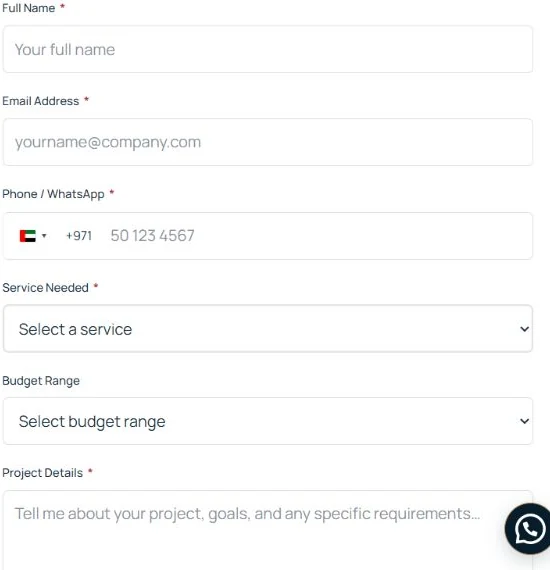
- Compare the same row. On desktop, inspect the Phone / WhatsApp and Service Needed controls. Compare their input borders as well as the label baselines; a country-selector wrapper can make a phone field behave differently from a normal input.
- Inspect the spacing before adding offsets. In browser developer tools, compare the labels’ computed margin and padding. Here the mismatch came from the phone label, so changing the service field’s position would have treated the symptom.
- Limit the correction to the affected form. We matched the phone label’s bottom margin to 9px rather than moving the whole row. The existing field definitions, required validation and submission actions were retained.
- Repeat at a narrow width. When fields stack vertically, check full-width controls, country-selector alignment and space between the label and its input. Use an approved test enquiry to verify delivery separately; visual alignment alone cannot prove email delivery.
You can inspect the current project enquiry form. The screenshot is an empty public form captured on 22 October 2026, with no visitor submission data. This is a documented layout correction, not a claim that a redesign increased enquiries.
Frequently asked questions
Do I need a complete rebuild or just a redesign?
That depends on the underlying problems. If the platform and content structure are sound, targeted design, content or performance improvements may be enough. A rebuild becomes more relevant when the existing setup cannot support the required functions or reliable maintenance.
Will a redesign automatically improve Google rankings?
No. Search performance depends on many factors. A redesign can address technical and content weaknesses, but careless URL changes or removed content can also cause problems. Plan the migration and monitor the outcome.
What should I prepare before asking for a quote?
Share the current website, priority problems, required pages and functions, available assets, decision-makers and preferred timing. For budgeting context, read our website development cost guide for Dubai.
Plan the next step around your business
Start with an audit and a clear brief. You can then choose a focused improvement project or a complete website redesign based on actual needs. To discuss your current site and priorities, send a project enquiry.